
Seven free weekly calendar templates in Microsoft Word. They are undated, so one file works for any week of any year — and the first thing to decide is whether your week starts on Sunday or Monday, because that choice trips up more people than anything else about a weekly planner.
- Layouts7 designs
- FormatMicrosoft Word
- YearUndated — works for any week
- CostFree, no signup
Does your week start on Sunday or Monday?
There is no universal answer, which is exactly why it causes trouble. A template built around one convention looks wrong to someone who uses the other, and a shared planner with mismatched weeks causes genuine confusion.
- Monday start is the international standard. Under ISO 8601, Monday is the first day of the week, and it is the common convention across most of Europe and much of the world. It has a practical advantage too: the weekend sits together at the end rather than being split across the page.
- Sunday start is the common convention in the United States, Canada and several other countries, and it is what most US-made templates and wall calendars use.
Pick whichever matches how you already think about a week, then make sure everyone sharing the planner uses the same one. If you work across countries, be aware that “week 32” can mean different weeks to different colleagues, because week numbering follows the same split.
The layouts
Seven weekly designs. They differ mainly in orientation and in how much room each day gets, which is worth matching to the kind of week you have rather than to whichever looks tidiest.


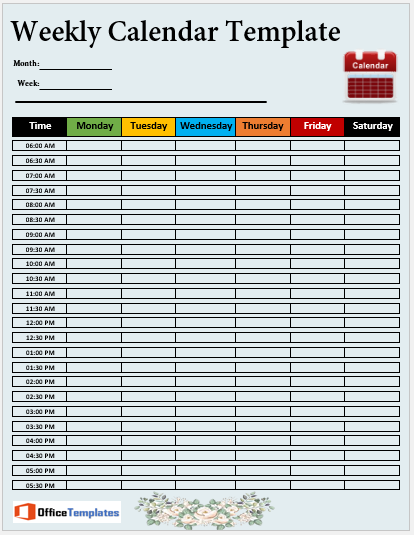


Horizontal or vertical?
| Layout | Suits |
|---|---|
| Days across the page horizontal |
Comparing days at a glance and spotting a busy stretch. Less room per day, so better for a few entries each. |
| Days down the page vertical |
Days with a lot in them. More writing space per day, harder to see the shape of the week. |
| Time-blocked grid | Weeks driven by appointments. If most of your week is clock-bound, a daily schedule per day may serve you better than a weekly grid. |
What actually belongs on a week view
A weekly calendar works best when it holds the things that need to be seen in relation to each other. Everything else belongs somewhere with more room.
- Fixed commitments — meetings, classes, shifts, appointments. The skeleton of the week.
- Deadlines falling this week, marked on the day they are due.
- The two or three things that must happen, placed on specific days rather than floating.
- Anything involving other people — collections, lifts, handovers, deliveries. These are what go wrong when only one person knows about them.
- A small notes area for what comes up mid-week.
Detailed task lists are better kept separately — a weekly to-do list alongside the calendar keeps the calendar readable, since a grid crammed with twenty small tasks stops showing you the shape of the week. For anything longer-range, keep a monthly calendar as well and move items across as they approach.
Dating the week in seconds
-
Type the first date, then fill across
In Excel or Google Sheets, type the date of your Monday or Sunday in the first cell, then drag the small square at the corner of the cell across the row. The remaining days fill in automatically. In Word, type them — it is seven entries.
-
Add the week number if you use them
In Excel, =ISOWEEKNUM(A1) returns the standard week number for the date in A1. Useful if your organisation plans in week numbers, and it follows the Monday-start convention described above.
-
Save a blank dated master
Keep one clean copy with the layout set up and no entries. Each week, copy the master rather than deleting last week’s notes one by one.
-
Print it to fit one page
If you are using a spreadsheet version, set Page Layout, Scale to Fit, with Width and Height both at 1 page. That single setting is what stops a week printing across two sheets with Sunday stranded on its own.
The weekly review
The week is a useful planning unit precisely because it is long enough to contain real commitments and short enough that you can still change it. Fifteen minutes at the same point each week — Friday afternoon or Sunday evening — is enough.
- What is fixed next week, and therefore how much free time actually exists?
- What did not happen this week, and does it move or go?
- What needs starting now to be ready for something later?
- What involves other people, and have they been told?
Doing this once a week is more effective than replanning every morning, and it is the habit that makes any planner worth keeping. For recurring household routines, pair it with a cleaning schedule so repeating jobs do not need rewriting onto the calendar each week.
Common questions
Are these for a particular year?
No — they are undated, so one file works for any week of any year. You add the dates, which takes seconds using the fill method above.
Can I change the week to start on Monday?
Yes. Retype the day headings and shift your dates one column. The grid itself does not care which day comes first.
Do I need Microsoft Word?
No. Upload the file to Google Docs or open it in LibreOffice. For a version you can fill in on a phone, Google Sheets handles the grid layouts well.
Can I use one for a team or family?
Yes. Use a layout with a column or row per person, and keep it somewhere everyone passes — a shared planner nobody sees is just a private one.
What about staff rotas?
A weekly calendar works for a small team, but scheduling several people across shifts is easier with an employee work schedule, which is built for names against days.
Can I use these commercially?
Yes, including for team planning. You may not resell or redistribute the template files themselves. See our Terms of Use.


Pingback: Weekly Expense Report Templates for Travel and Reimbursement