
Six free retirement budget templates for Word and Excel. A retirement budget is not just a household budget with a different title — several costs disappear, a few grow substantially, and the shape of your spending changes over the decades that follow.
General information, not financial advice. This page describes what a retirement budget document usually contains. It is not a recommendation about saving, investing, drawing an income or how much money you need. Tax treatment, state pensions and retirement accounts differ by country and change. Speak to a qualified financial adviser about your own circumstances.
- Templates6 layouts
- FormatWord and Excel
- Opens inWord, Excel, Google Sheets, LibreOffice
- CostFree, no signup
Which budget are you building?
Two quite different documents share this name, and it helps to know which one you need before you start filling cells.
| Purpose | What it does |
|---|---|
| Planning ahead | You are still working and estimating what retirement will cost. Largely projection: future costs in today’s money, matched against expected income. Reviewed once a year and revised as things change. |
| Living on it | You are retired and tracking actual income and spending month by month. Closer to an ordinary household budget, but with income arriving from several sources on different schedules. |
If you are planning ahead, build the expense side first and the income side second. Working the other way round tends to produce a budget that matches your savings rather than your life.
The templates
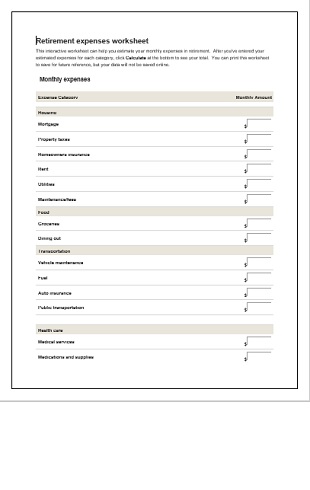
Six layouts covering both uses. The spreadsheet versions total categories automatically, which matters here because retirement budgets are usually revisited many times.


What actually changes
Copying your current household budget into a retirement one is the usual starting point, and it misleads in both directions. Some costs vanish, others grow.
Costs that fall or disappear
- Commuting, parking, and often a second car
- Work clothing, lunches and incidental work spending
- Pension and retirement account contributions — you stop paying in
- Mortgage payments, if the mortgage ends before or during retirement
- Costs of supporting children, for some households
Costs that rise
- Healthcare. The largest and least predictable item, and the one most often underestimated. Include insurance or contributions, dental and optical, prescriptions, and an allowance for the things insurance does not cover.
- Utilities. Being at home all day costs more to heat, cool and light than being out at work.
- Leisure and travel, particularly in the early years.
- Home maintenance, as you spend more time in the house and may be paying for work you previously did yourself.
- Help and care later on, which people commonly leave out entirely.
Spending does not stay flat
Retirement budgets are often built as one monthly figure projected forward twenty-five years. Real spending tends to move through phases instead, and planning for a single flat number misses that.
- The early, active years. Travel, hobbies, home projects, visiting family. Frequently the most expensive phase, and the one people are surprised by.
- The quieter middle years. Less travel, more settled routines. Discretionary spending usually falls.
- The later years. Discretionary spending falls further, while health and care costs can rise sharply.
You cannot predict the timing, but building the budget with three columns rather than one makes the shape visible and the assumptions explicit.
List every income source separately
Most budget templates have one income line, which is fine while a salary arrives monthly. Retirement income usually comes from several places on different schedules.
- State or government pension
- Workplace or occupational pensions
- Personal pensions and retirement accounts
- Annuity income, where you have one
- Drawdown or withdrawals from savings and investments
- Rental income
- Part-time or consultancy work
- Savings interest and dividends
Give each its own row, with the amount, how often it arrives, and whether it is taxable. Note which ones rise with inflation and which are fixed — over a long retirement that distinction matters more than the starting amounts.
The things people leave out
- Inflation. Over twenty-five years it changes everything. If your template works in today’s money, say so in a note on the sheet so you remember when you revisit it.
- Irregular large costs. A car replacement, a new boiler, a roof, major dental work. Budget them as an annual provision rather than pretending they will not happen.
- Tax. Retirement income is often taxable, and how depends entirely on where you live and what the income is. Budget net figures, not gross.
- One-off costs at the start. Retirement frequently begins with a trip, a move, or a long-postponed project.
- Supporting others. Adult children and ageing parents both feature in more retirement budgets than people anticipate.
Keeping it current
-
Start from real numbers
Pull twelve months of actual bank and card statements and categorise them, rather than estimating from memory. Nearly everyone underestimates their own spending, usually in the smaller recurring categories.
-
Adjust line by line
Work down the list and ask what happens to each category when work stops. That is a more reliable method than adjusting a total up or down by a percentage.
-
Note your assumptions on the sheet
Inflation, retirement date, whether figures are in today’s money, what you assumed about healthcare. In two years you will not remember, and the assumptions matter more than the arithmetic.
-
Review once a year
Put it in the calendar. Costs shift, rules change, and circumstances change faster than long-range plans assume.
Common questions
How much do I need to retire?
That depends on your costs, your income sources, where you live and how long you live — and it is the question to take to a qualified adviser rather than a template. What a budget does is show you what your retirement would cost, which is the input any adviser will ask for first.
How many years should I plan for?
Longer than average life expectancy, because planning to the average means a coin flip on outliving the plan. Your adviser can frame this properly against your own circumstances.
Do I need Microsoft Office?
No. Google Sheets and Google Docs open these free in a browser, and LibreOffice works offline. Formulas in the spreadsheet versions carry over.
Should I budget monthly or annually?
Both. Monthly for day-to-day running costs, annual for the lumpy items — insurance, car, maintenance, travel. A monthly-only budget consistently understates the real total.
Should I use today’s money or future prices?
Today’s money is easier to reason about, as long as you write that assumption on the sheet and handle inflation separately. Mixing the two silently is how projections go wrong.
Can I use these commercially?
Yes, including with clients. You may not resell or redistribute the template files themselves. See our Terms of Use.


Pingback: Retirement Plan Templates for Working Out If You Are On Track
Pingback: Employee Pension Plan Templates and What the Law Requires
Pingback: Amortization Schedule Templates: See Where Every Payment Goes
Comments are closed.